

Frequently Asked Questions
General
What kind of information is displayed in the xsnipe feed?
xsnipe collects and displays, in chronological order starting with the most recent, the latest listings, price updates, auctions, swaps, offers, global offers, sales and accepted offers from the most well-known marketplaces on MultiversX.
Which marketplaces are currently integrated with xsnipe?
xsnipe gathers NFTs from top NFT marketplaces on MultiversX blockchain - XOXNO, EApes, OOX, FLIPiX, KroganSwap and DeadRare.
Can I list an NFT to xsnipe?
xsnipe does not currently support the direct listing of NFTs and we do not have any plans to enable this feature in the future.
xsnipe is a custom sniping aggregator that gathers NFTs from the major marketplaces on the MultiversX blockchain. This means that if you want to sell an NFT, you must first list it on one of these marketplaces and then xsnipe will gather the listing and display it in the search results.
How can I activate the TRIAL plan?
To activate the TRIAL plan, you have to donate at least 0.1 EGLD to xsnipe's wallet. The wallet information can be found at the bottom of the page.
What is the transaction status?
When someone is trying to sell an NFT by listing it on a specific marketplace, the transaction which occurs on the blockchain goes through different states. The status labeled success means that the transaction is complete and the status labeled pending means that the transaction has been initiated.
A pending transaction is displayed usually at the beginning of the results list. The NFT card showing a pending transaction has a yellow border around the price box.
Custom alerts
How can I set a custom alert?
To set a custom alert, click the  button to open the adding alert modal window.
For example, let's say you want to be alerted when a Gnogon with a POWER of 100 is posted for less than 10 EGLD.
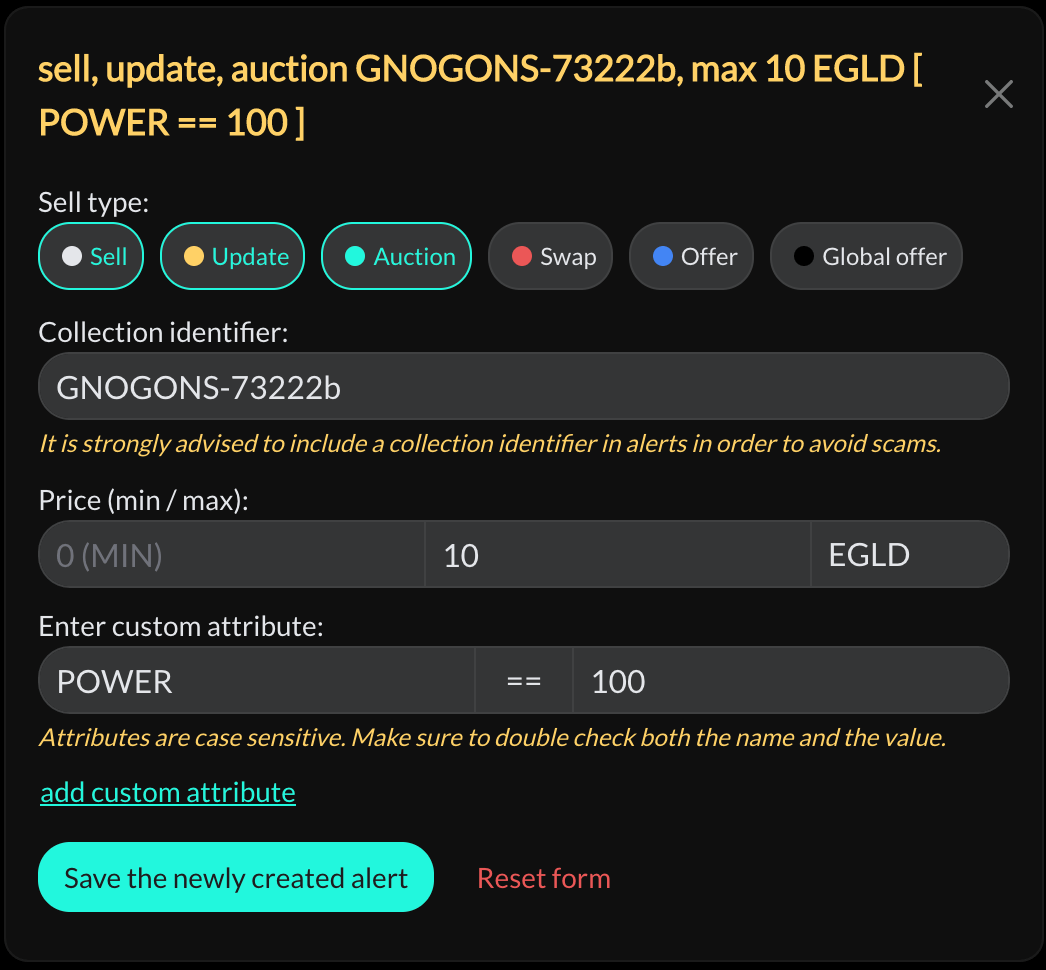
- In the Collection field, enter the collection ID using the autocomplete function and click Validate;
- Set the price range;
- Click Add custom attribute and select the desired attribute and value;
- Click Save the newly created alert.
To set alerts, you must be logged in. The alerts will be saved to your account and will be accessible on all devices even after you log out. In the current version, you can add a maximum of 3 alerts for the FREE plan, and an unlimited number of alerts for the TRIAL plan.
How am I notified when a custom alert is triggered?
Currently, there are three ways in which users can be notified when a custom alert is triggered:
- Visually, by framing the NFT card that triggered the alert in a red border;
- Audibly, by playing a specific sound;
- Through a message received on Discord, Telegram or Email (offline alert).
How can I activate Discord, Telegram or Email notifications?
Discord, Telegram and Email notifications are currently available only to users with an active TRIAL plan.
To activate, go to your Account, select Authorize Discord / Authorize Telegram or Add an Email address and confirm.
Why is the alert button red when I refresh the page? 
The browser prevents a sound from being played unless the user interacts with the page first. So if you refresh the page and the alert button is red, it means that the sound, in case of a triggered alert, cannot be played until you interact with the page.
To ensure that you receive audio alerts, it's always a good idea to check that the site is not muted in your browser and that the volume is turned up. This will ensure that you receive both visual and audio notifications when an alert is triggered.
Filters
How can I filter the displayed feed?
xsnipe has designed two ways to filter results:
- Displaying exclusively filtered results by sell type, price, token, marketplace, transaction status, or collection.
- Excluding certain collections from the feed by entering them in the Filter - exclude collection field or clicking the Exclude collection from list button in the dialog window of an NFT.
Why does the feed not show any results when I filter by a specific collection?
xsnipe operates on the principle that what is good and cheap sells immediately. As a sniper aggregator, we only display the latest listings, including price updates, auctions, swaps, offers, global offers, accepted offers and sales from the most well-known marketplaces on MultiversX. We do this to avoid cluttering the interface with old and irrelevant listings. Therefore, if the filter does not show any results, it means that there has been no recent activity with that particular collection on the marketplaces.
Direct buy
Is there any risk of losing money if I initiate a Direct buy and the transaction is rejected?
When you initiate a Direct buy on xsnipe, you are actually initiating a buy on the originating marketplace. While we have confidence in our partners (XOXNO, EApes, OOX, FLIPiX, KroganSwap and DeadRare), we cannot be held responsible for any errors on their end.
However, xsnipe's Direct buy function can be initiated even during the pending stage of the listing. If the buy transaction fails for any reason, such as the listing failing, the NFT being purchased by someone else faster, or any other reason, the money will be returned to your wallet.
xsnipe does not have direct access to your funds; instead, it intermediates the buy command from the original marketplace.
Does the Direct buy function have any additional fees?
xsnipe does not charge any commission/fee for buy transactions.
xsnipe acts as an intermediary between the user and the marketplace, and any fees associated with the transaction are charged by the original marketplace.
Additionally, the original marketplace is responsible for managing the payment of royalties to creators.